
VITA - Video Editor & Maker
SNOW CorporationVideo Players & Editors
4.26.58K Reviews
- Version
- 302.0.18
- Installs
- 100.00M
- Age Rating
- Everyone
Screenshots
Our Review of VITA - Video Editor & Maker
 Analysis by Appyee
When I choose a mobile editor, I start with a practical question: can I turn ordinary clips into something I’m happy to share without spending half the evening learning the interface? That is the kind of job VITA - Video Editor & Maker is built for. It is a free video editing app from SNOW Corporation, and I see its main appeal in the balance between quick, approachable edits and enough creative tools to make a short video feel personal.
It suits people who edit for social posts, family moments, travel snippets, or just the fun of experimenting. I would not pick a phone editor as a replacement for a desktop workflow that depends on detailed, frame-by-frame control, but that is not the decision most casual creators are making. The more useful question is whether VITA makes routine edits feel manageable, and whether its ready-made creative options help rather than get in the way.
What to consider before you start editing
Think about the videos you actually make. If you mostly need to trim a clip, add a title, adjust the pace, and put music underneath, an accessible mobile editor can save time compared with opening a more involved editing program. If your projects depend on elaborate layering, exact audio mixing, or a carefully managed production pipeline, you may prefer a more advanced editor designed around those demands.
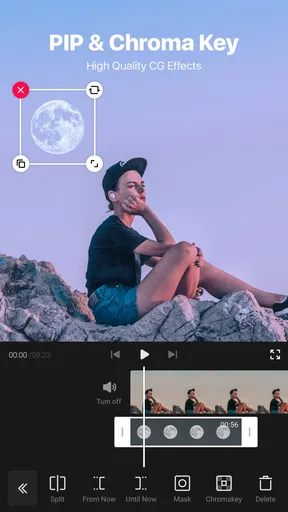
VITA makes the most sense when speed and visual polish matter more than exhaustive control. Templates can give a project a starting shape, while filters, effects, text, speed changes, and music offer several ways to make the result your own. My advice is to begin with a small project and see whether the available controls match your habits before committing a large batch of footage to a new workflow.
A useful fit for everyday clips
Picture coming home with a handful of short clips from a walk, a meal, or a day out. You want to make a compact recap, not build a full documentary. In that situation, I would first choose the clips that tell the story, trim away the waiting and camera movement, and then decide whether a template helps organize the sequence. A short title can explain the moment, and a music choice can give the clips a shared mood.
The useful discipline is to treat templates as scaffolding, not as a finished idea. I would swap in only the shots that fit the rhythm, remove anything that feels repetitive, and check that the text remains readable against every clip. This small review before exporting often matters more than adding another effect: it keeps a quick edit from looking busy simply because the tools are available.
For a creator who posts occasional short videos, that workflow can be more appealing than starting with a blank timeline every time. For a parent assembling a casual family recap or a traveler making a personal highlight reel, a straightforward sequence of trims, titles, and music may be all that is needed. If the goal is precise storytelling with many versions and detailed revisions, the simplicity that helps here can also become restrictive.
Where it sits among mobile editing choices
Compared with a basic phone gallery editor, VITA offers a more creative route: the templates and stylistic tools encourage you to shape a clip rather than just shorten it. Compared with a more timeline-focused editing app, its attraction is approachability and a faster path to a presentable result, not a promise of deeper production control. Those are different priorities, so I would choose based on the project rather than assuming one style of editor is best for everyone.
There is also a sensible middle ground between using a template for the whole video and editing every detail yourself. I would use a template to get a visual direction, then make deliberate choices about which effects and text actually support the footage. If a template’s pace does not suit the clips, forcing the material into it can make the finished video feel less natural than a simple sequence edited from scratch.
People who want fine control over every cut or who regularly handle long, complicated projects should compare VITA with editors built for a more hands-on timeline workflow. On the other hand, someone who finds professional-style controls discouraging may get more value from a tool that lowers the barrier to making and finishing a video. The best choice is the one that fits the amount of control you will genuinely use.
Small habits that make edits easier
Before opening an editing project, I find it helpful to decide what the video is for and choose the strongest clips first. That prevents a common mobile-editing trap: spending time polishing footage that does not belong in the final cut. When working with music, I would also watch the edit once with the sound on and once with the sound off. The second pass catches titles that flash by too quickly or visual transitions that only feel clear when the beat is playing.
Speed changes work best when they serve a specific moment. A quickened section can make repetitive action feel lively, while slowing a brief shot can give it more emphasis. Applying either treatment everywhere tends to flatten the contrast, so I would save those changes for clips where the shift in pace adds meaning or humor.
Text deserves the same restraint. A title can orient viewers who do not know the context, but several competing captions can crowd a short frame. I would keep the wording short and preview it over the brightest and darkest parts of the footage. This is a simple check, but it can prevent a stylish font from becoming hard to read once the background changes.
When exporting, choose a resolution with the intended destination in mind rather than automatically selecting the largest option. A social post, a message to family, and a project you want to keep for later do not necessarily need the same balance of clarity and file size. VITA offers resolution choices, so considering where the video will be watched can help avoid an unnecessarily large export or a result that looks softer than you wanted.
What the quick workflow trades away
Templates and one-tap effects can make it easy to get moving, but they can also make different videos feel alike if you accept the first look without editing it. I would treat the preset style as a suggestion and check whether its transitions, text, and mood suit the actual footage. Sometimes the most personal result is the less decorated one: clean cuts, a useful caption, and music that does not compete with the images.
Mobile editing also involves practical friction. A longer project means more clips to review on a small screen, and repeated adjustments are less comfortable than working with a mouse and a larger display. Even when an app performs smoothly, a phone-based workflow is not automatically the best choice for projects that need extensive revisions. I would keep VITA for edits whose scope matches the convenience of editing on a phone.
It is worth checking the finished video from beginning to end before sharing it. That final watch can reveal an awkward cut, a title that arrives too late, or music that feels wrong beside a particular shot. I would make those corrections while the project is still open rather than assuming a fast export means the edit is finished. The extra minute is often a better use of time than adding another filter.
Who should choose it—and who should look elsewhere
VITA is a good candidate if you are new to editing, make short videos now and then, or want creative options without first learning a complicated interface. It can also suit someone who already knows the basics but values a quick template-led starting point for informal posts. Its free price removes the need to make an upfront purchase decision, and its Everyone age rating makes it broadly accessible as an app, though that does not change the need to choose appropriate material and music for your own audience.
I would look elsewhere if your normal work depends on detailed control over many tracks, repeated client revisions, or a long-form editing process that is easier to manage on a computer. A basic built-in editor may be enough if all you ever do is trim the start and end of a clip. VITA is most worthwhile between those extremes: when you want more expressive options than a simple trim but do not need a full production setup.
Switching editors has a small but real cost: you need to learn where the controls are and establish a routine that suits your projects. I would not move an entire editing habit over just because a template looks appealing. Try one self-contained video, keep the source clips available, and judge the result by how much effort it took to reach a shareable version. That gives you a fair comparison with your current method without making the switch feel like a commitment.
The Interface: Where Simplicity Meets Functionality
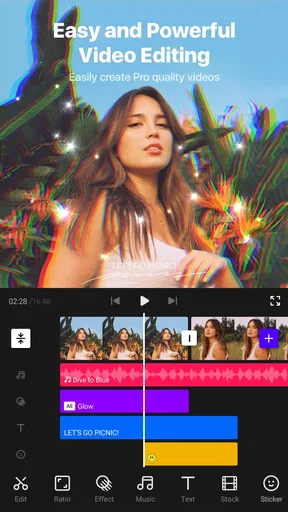
The first thing that struck me about VITA is its sleek and intuitive interface. You know when you download an app and you’re immediately lost? Not here. VITA makes it super simple to dive right in with its straightforward navigation. The home screen offers quick access to new projects, saved works, and a treasure trove of templates.
This app is perfect for those who might be a little intimidated by the complexity of professional editing software. With VITA, you don’t need a degree in film editing to make something awesome. Everything is laid out in a way that feels accessible, whether you’re trimming clips or adding effects.
Features Galore: Unleash Your Creativity
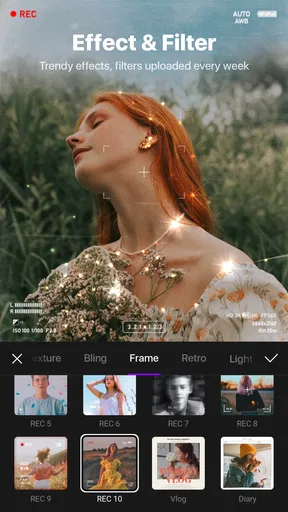
Now, let's talk about what you can actually do with VITA. Spoiler alert: a lot! This app is packed with features that will keep you entertained and your videos looking sharp. You can choose from a variety of filters and effects to give your videos that extra pizzazz. And the best part? It’s all super easy to apply. Just tap, and voila!
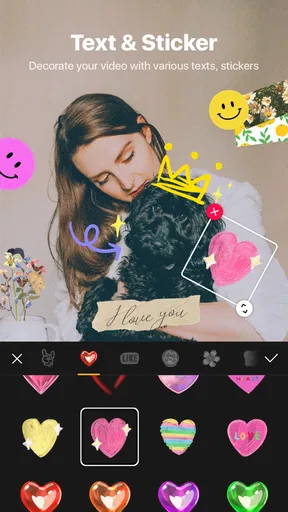
Want to add some text? No problem. VITA offers a wide array of fonts and styles, so you can personalize your videos to match your vibe. Plus, the speed adjustment tool is a game-changer. Whether you want to speed things up for a funny effect or slow it down for dramatic impact, VITA’s got you covered.
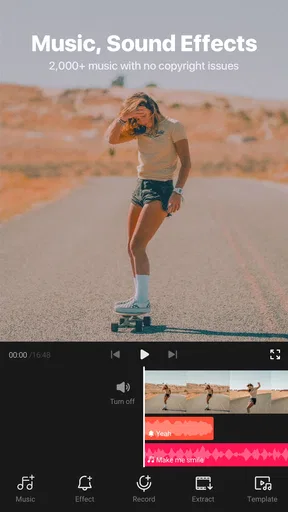
And let’s not forget about the music! Music can make or break a video, and VITA knows it. You can either choose from their library of tracks or import your own. Syncing music to your video is a breeze, ensuring that your edits hit all the right beats.
Templates and Tutorials: Learning by Doing
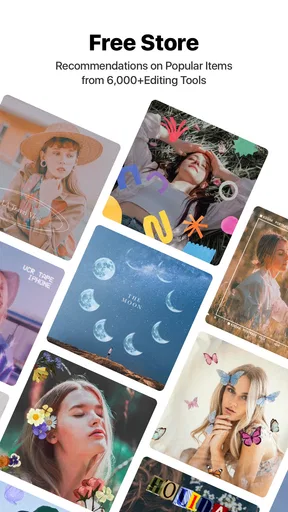
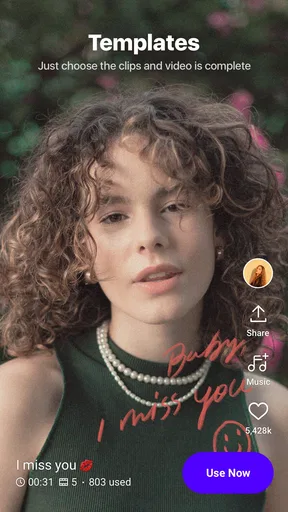
If you’re ever stuck or just need a little inspiration, VITA has an impressive collection of templates. These are perfect for those times when you want to create something quickly without starting from scratch. Simply select a template, swap out the media, and you’re good to go!
For those who love to learn, VITA offers tutorials that can guide you through more complex editing techniques. Even if you’re a complete novice, these resources can help you level up your editing skills in no time.
Performance: Smooth Sailing
Nobody likes an app that crashes or lags, especially when you’re in the middle of crafting a masterpiece. Luckily, VITA delivers a smooth performance. Throughout my testing, the app ran without a hitch. Whether I was working on a short clip or a longer project, everything was seamless.
Plus, exporting your final creation is quick and painless. You can choose from different resolutions, which is great if you’re planning to share your videos on social media platforms.
For a short clip, that quick export can make the whole phone-first workflow feel satisfying: you make a few choices, check the result, and have a finished video ready to share. For a project you may want to revise later, I would keep the original footage and avoid treating the exported file as a substitute for the editable project. That habit gives you room to change the cut or soundtrack without having to reconstruct the edit from a flattened video.
VITA is version 302.0.18, and it runs on Android 8.0 or later. Its reach is reflected in over 100 million installs, alongside an average rating of 4.2 from around 958,000 ratings and about 6,600 written reviews. I take those figures as a sign that this is a well-established option, not proof that every editing style will suit it; the right test is still whether its workflow feels comfortable with your own clips.
VITA’s developers clearly put a lot of thought into ensuring that users have a reliable and enjoyable experience. It’s the kind of app that keeps you coming back because it just works.
Final Thoughts: A Must-Have for Video Enthusiasts
So, what’s the verdict? Simply put, VITA - Video Editor & Maker is a fantastic tool for anyone looking to dive into the world of video editing. Its combination of ease-of-use, powerful features, and reliable performance makes it a standout choice.
Whether you’re making videos for fun, social media, or even semi-professional projects, VITA has something to offer. It’s like having a personal editing suite that fits in your pocket. So go ahead, download it, and unleash your creative potential. Trust me, you won’t regret it!
For me, the recommendation is strongest for quick, personal edits where a template, a few careful cuts, and a considered soundtrack are enough to bring footage together. I would choose a more hands-on editor for intricate, revision-heavy work, and I would choose the simplest built-in tool when all I need is a trim. Between those cases, this is an easy app to try: start with one short video, keep the effects purposeful, and see whether finishing an edit on your phone feels like a pleasure rather than a chore.
And there you have it! That’s my take on VITA. Happy editing!
Verdict
Strengths of VITA - Video Editor & Maker
- Intuitive interface for easy editing.
- Wide range of filters and effects.
- High-quality export options available.
- Numerous templates for quick edits.
- No watermark on exported videos.
Limitations of VITA - Video Editor & Maker
- Limited advanced editing tools.
- Occasional in-app ads.
- Some features require in-app purchases.
- Can be resource-heavy on older devices.
- Limited music library options.
Other Releases by SNOW Corporation
View All
B612 AI Photo&Video Editor
Photography4.1

SNOW - AI Profile
Photography3.7
Similar Picks in This Category
View All
Google TV
Google LLC3.9

iTunes
Apple4.7

YouTube
Google LLC3.8

MX Player
Amazon Mobile LLC4.2

CapCut - Video Editor
Bytedance Pte. Ltd.3.5

PLAYit-All in One Video Player
PLAYIT TECHNOLOGY PTE. LTD.4.5
Frequently Asked Questions
What features does VITA - Video Editor & Maker offer?
VITA provides a comprehensive suite of video editing tools, including trimming, merging, and speed adjustments. It offers a wide range of filters, effects, and text options to enhance your videos. Additionally, it supports HD export and includes templates for easy video creation, making it suitable for both beginners and advanced users.
Is VITA - Video Editor & Maker free to use?
Yes, VITA is free to download and use, offering a substantial range of features at no cost. However, it does have in-app purchases and a subscription model that unlocks additional premium content, such as exclusive effects and templates, for users who want to expand their editing capabilities.
Does VITA support multiple video formats?
VITA supports a variety of video formats, ensuring compatibility with most smartphones. It can handle popular formats like MP4 and MOV, allowing you to import and export videos seamlessly. This flexibility makes it easier to work with different media files without worrying about conversion issues.
Is VITA suitable for professional video editing?
While VITA is designed with user-friendliness in mind, it offers powerful tools that can cater to semi-professional editing needs. It may not completely replace desktop software for high-end projects, but its range of effects, transitions, and editing tools make it a strong choice for social media content creators and hobbyists.
Can I share videos directly from VITA to social media platforms?
Yes, VITA allows you to share your edited videos directly to various social media platforms, including Instagram, TikTok, and YouTube. The app's export settings optimize the video quality for different platforms, ensuring your content looks its best when uploaded, saving you time and effort.
